This is one of the ways by the means of which you can control your ipod,iphone. This is basically a cydia tweek for jailbreaked iphone and ipod.
Much to the amazement, it accepts your voice commands very clearly. Just as you use the iphone, ipod inbuilt voice assisted search you can use this. After loading this tweek you can add your own commands in which ever way you like.
You can open 1.apps 2.Bluetooth 3.Wifi 4.safari web browser And much more.....
AirServer for iOS turns your iPhone, iPad, or iPod touch into an AirPlay receiver. With AirServer installed, you can stream audio, videos, photos, and slide shows from your Mac to your iPhone, iPad or iPod Touch or between iOS devices.
AirServer for iOS is the first application that transforms your iOS device into an AirTunes and AirPlay receiver. It’s like having an AirPort Express and Apple TV in the palm of your hand, because it lets you stream audio, videos, photos, and slide shows from your Mac to your iOS device or between iOS devices.
AirServer Features
iTunes Streaming AirServer lets you stream audio and video directly to a computer from iTunes without any synching hassles.
AirPlay enabled 3rd Party Apps AirServer is compatible with a wide variety of AirPlay enabled third party applications. Vevo, PBS, StreamToMe, AirVideo, YouTube, you name it!
Audio Streaming AirServer is the first Mac/iOS application that lets you stream audio directly to your computer/iOS device from iTunes or another iOS device. This is a highly prized feature in and of itself, but AirServer’s audio streaming goes above and beyond the call of duty. In addition to streaming audio content from your iOS device or iTunes, you can close any 3rd party audio streaming app without disrupting the music!
Video Streaming AirServer is your home entertainment system’s missing link. Simply hook your Mac/iOS device up to an HDTV and stream movies, TV shows, trailers, or other video content to it over AirPlay. Voilà.
Photo & Slide Show Streaming Ever been at the office, or visiting friends, and wished you could show off your latest photos or home videos? Now you can, because AirServer supports photo, slide show, and personal video streaming from the Photos app. This means no more having to flick through an entire vacation album photo-by-photo, and you’ll get a guaranteed kick out of instantly recording and streaming your personal videos onto a bigger screen or another iOS device!
YouTube Streaming Sooner or later, the house-party is going to end up in ‘let-me-show-you-what-I-saw-on-YouTube’ mode, so it’s a good thing AirServer supports streaming from the YouTube app. Have you seen the sneezing baby panda? What about the ticklish penguin?
AirServer Requirements
iOS 4.0 or newer on device running AirServer.
Streaming audio from computer: iTunes 9.2 or newer.
Streaming video from computer: iTunes 10.2 or newer
Streaming from iOS device: iOS 4.2.1 or newer.
DRM protected content is not supported.
Devices must be on the same WiFi network.
Download AirServer
You can purchase and download AirServer for iOS from Cydia, under the Big Boss repository, for $4.99.
CameraWallpaper is a new tweak available in Cydia that lets you use the camera of your iPhone as your wallpaper, meaning that anything your camera sees will be displayed as your wallpaper.
As soon as you are on your iPhone springboard, you will see whatever is in front of your camera as a wallpaper. Thanks to an intuitive Activator integration, you will also be able to snap a picture at any time and use this picture as your wallpaper.
Confused about how CameraWallpaper works? Then check out the video below
CameraWallpaper includes the following features:
Use your live camera as your wallpaper
Take a picture anytime from SpringBoard
Innovative control menu, activator-enabled
Toggle between front and rear camera
Turn the torch on/off
Set flash mode (auto,force-on,force-off) when capturing photos
Auto Focus
Auto Exposure
Auto WhiteBalance
Pause-resume camera
Auto-start modes
Battery saving options
Set video transparency so you can see your wallpaper in the back
Set icons transparency
The question on everybody’s mind now must be “what about battery life?” Well, obviously this tweak will drain your battery, but I guess it’s the price to pay for such an innovative mod.
VoiceActivator is a new jailbreak tweak by chpwn that lets you take full control of Voice Control on iPhone, iPad and iPod Touch. You can launch apps, open URLs, use Activator actions: it’s all here, in one tweak; VoiceActivator.
Watch the VoiceActivator video demo after the jump…
Custom Voice Control commands! VoiceActivator is a new tweak by chpwn to let you take full control of the Voice Control feature of your iPhone or iPod touch. Launch apps, open URLs, use Activator actions: it’s all here, in one tweak.
VoiceActivator will be available in Cydia Soon. There’s no word on pricing.
It’s been a week of new jailbreak apps and another new one was just announced. Developed by Chpwn, VoiceActivator is a tweak that opens up a world of new voice commands for iOS devices.
….. to let you take full control of the Voice Control feature of your iPhone or iPod touch. Launch apps, open URLs, use Activator actions: it’s all here, in one tweak.
Being able to launch apps and web pages with your voice will certainly appeal to many, and could possibly make using an iPhone while driving safer.
VoiceActivator is coming to the Cydia Store soon. More info when we’ve played with it!
Let’s face it; the more apps and tweaks you install on your iPhone, the more likely it is for your status bar to become cluttered. I’ve got it particularly bad, it’s such a problem that some of the status bar icons on my iPhone’s screen were beginning to overlap.
It’s almost as if the developer of CleanStatus read my mind, because as soon as I started looking for apps and tweaks to disable or get rid of, here comes CleanStatus…
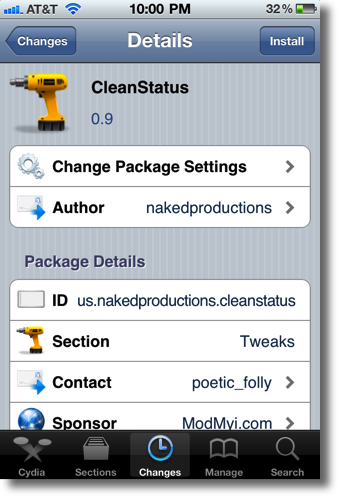
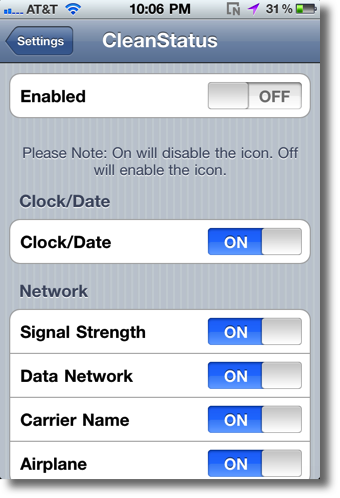
CleanStatus is a free jailbreak tweak available on Cydia, hence no app icons are placed on your Home screen upon installing it. Instead, you’re greeted with a nice assortment of options in your Settings.app, options that are bound to make your status bar as clean as a whistle.
Among the bountiful lot of options that litter the settings for CleanStatus are toggles for Clock/Date, Data Network, Carrier Name, Airplane, Battery, Battery Percentage, Bluetooth, etc, etc. In total I counted 17 toggles that are initially available to disable on your status bar.
Once you turn a particular toggle on, the selected item disappears from your status bar in a matter of seconds. The cool thing about CleanStatus is that this happens on the fly, no pesky resprings required. This makes it something that I would consider using quite often, considering it’s a fairly quick operation.
Of course, not every status bar icon is available in the toggles, and frankly adding every one would be pretty much near impossible. Still, it can be expected that the developer will continue to support their release and add more popular toggles when deemed necessary.


![VoiceActivator Allows Sustem-wide Voice Control [Video Demo]](https://blogger.googleusercontent.com/img/b/R29vZ2xl/AVvXsEiYSljNjGW1GcObeIvraYQk5QdBG-xtjVPALOwCLKZMKl87SxJIK92fPW1E7XELqi4RXx9qlJRcgQOnN5cuNP-oaeAr56cPCcGw8Lek-iCLVbbogbTxdQVoUp5M0Mmk6dvXmGmUwSoqMCLP/s1600/voiceactivator.jpg)
![VoiceActivator Brings Full OS-Wide Voice Control To iOS [Jailbreak Tweak]](https://blogger.googleusercontent.com/img/b/R29vZ2xl/AVvXsEhmHXCmhNc4cbRkcpRXqchb5tjsnlfucWrcmvpMWT3yE2CW8cpXb2TGcqV-tddE-DyYthPgaSb_N4FZmgRBSXuqUjBRDMuK48BYH0oy_dFLas4u3o_IMFqLlP50sJwxUgKDTkAQcZX5YqiI/s1600/Voice-Control.png)